Todas as versões ↓

Aplicativo 1.3.0 · build 25 ·

1.3.0 ~ Em que pista ficar 🛣️ As setas de faixa, a hora do jogo e a chegada que conta as paradas

Antes de cada saída e trevo, o Truck GPS agora mostra em que pista ficar. A hora do jogo aparece na faixa de baixo, a chegada e a distância contam as paradas da rota, e a tela do caminhão mostra a avaria de cada peça.

Versão principal

Fala, motorista!

Sabe aquela saída que chega de surpresa, com quatro pistas e você na errada? Acabou. Agora, perto de cada saída e trevo, o cartão da manobra mostra as pistas da estrada, e as que levam ao seu caminho acendem em verde. Dá para se ajeitar com calma, bem antes da hora.
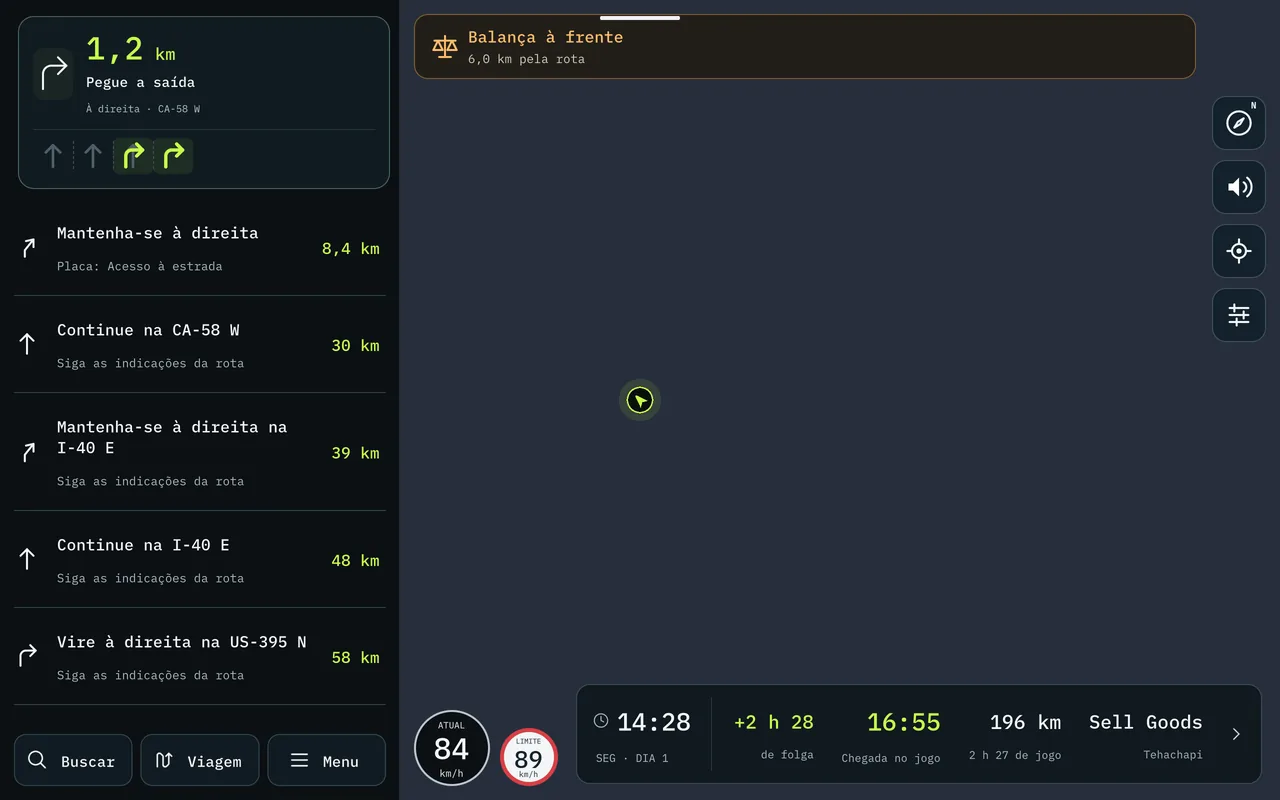
O mapa no tablet: o cartão da manobra com as quatro pistas, as duas da direita acesas

🚀 Novo / Melhorado

  • Em que pista ficar. Nas saídas e trevos com mais de uma pista, as setas aparecem sob a manobra: as certas em verde, as outras apagadas, para você contar a partir da borda. No celular elas ficam pequenas, para não tirar espaço do mapa; no tablet, em tamanho cheio.
  • A hora do jogo sempre à vista. A faixa de baixo do mapa mostra o relógio do jogo e o dia da semana, ao lado da chegada. E, sem frete, ela convida a buscar um destino.
  • A chegada que conta as paradas. Com paradas na rota, a hora de chegada e os quilômetros que faltam passam a contar o caminho todo, parada por parada, e não só a reta até a entrega.
  • Cada parada no resumo. Tocando na faixa de baixo, o resumo da viagem mostra cada parada numerada, com a distância e a hora em que você chega nela.
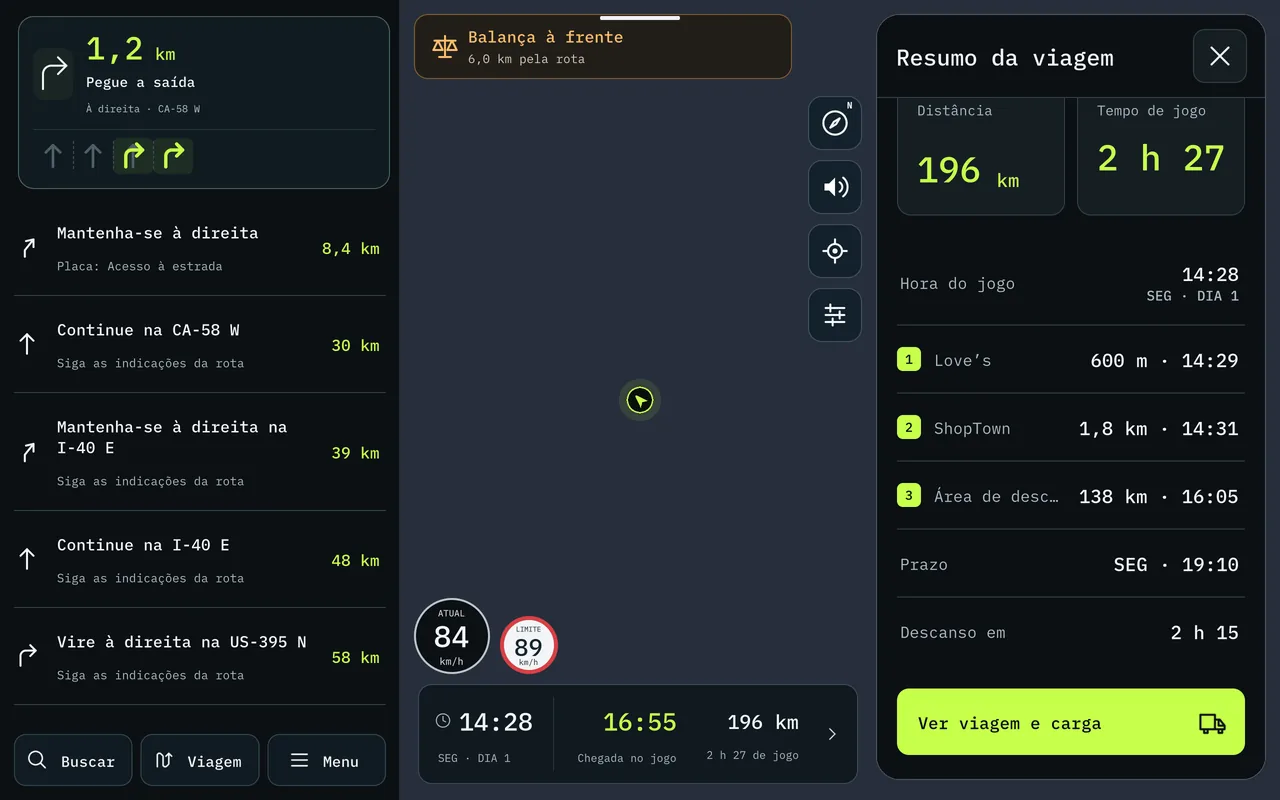
O resumo da viagem no tablet: a chegada, a hora do jogo e as três paradas com distância e horário
  • A avaria de cada peça. A tela do caminhão agora separa o desgaste do motor, do câmbio, da cabine, do chassi e das rodas, e também o do reboque e o da carga. O que passa do ponto fica em laranja, para você saber o que levar à oficina.
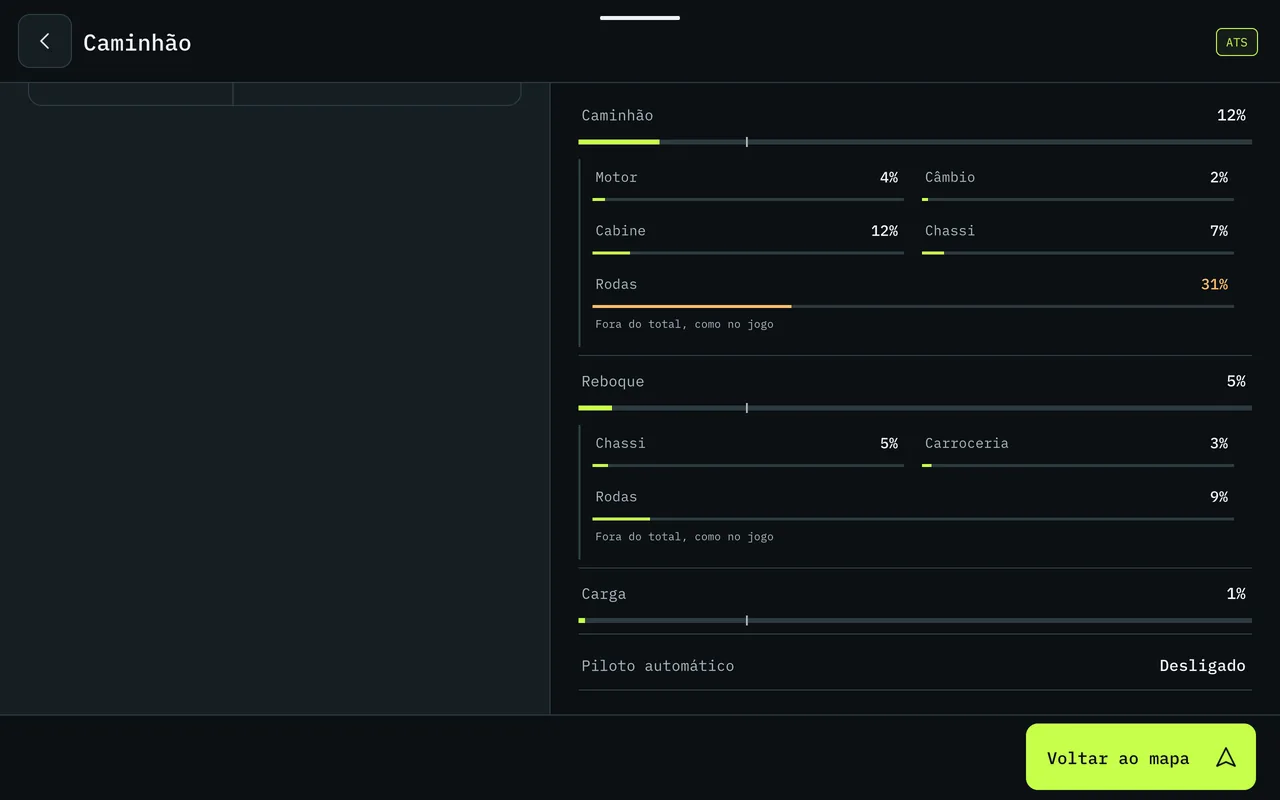
As avarias no tablet: caminhão, reboque e carga, peça por peça
  • O velocímetro mais baixo no celular. Ele desceu um pouco, deixando mais mapa à vista.

💻 No computador

Atualize o Truck GPS no PC para a 1.1.13: a empresa e o histórico de viagens passam a aparecer no celular em todas as suas carreiras, e o histórico fica guardado mesmo se você reinstalar o programa.

Boa estrada! 🚛

Todas as versões

  1. 1.3.0Em que pista ficar 🛣️ As setas de faixa, a hora do jogo e a chegada que conta as paradas
  2. 1.2.0Feito para o tablet 📱 O mapa deitado, a busca inteira e as paradas com cara de lugar
  3. 1.1.14A viagem inteira numa imagem 📸 O caminho, as paradas e os estados por onde passou
  4. 1.1.13Do seu jeito 🗺️ Rota com paradas, cada multa explicada e quinze idiomas
  5. 1.1.11Hora de descansar 🛏️ O posto para dormir a um toque e linhas que dá para ler
  6. 1.1.7Trevos que dá para ler 🛣️ Vaga do frete antes de carregar e avarias no painel
  7. 1.1.5South Dakota completo 🗺️ Milhas ou km, vagas de carga e o nome do estado na voz
  8. 1.1.3Sua empresa no celular 💼 Finanças, frota e viagens, e South Dakota e Illinois no mapa
  9. 1.1.0Um aplicativo novo por dentro ✨ Layout novo, painel do caminhão e alfinetes
  10. 1.0.0Na Google Play 🚀 Voz, conta, PRO e o ETS2
All versions ↓

App 1.3.0 · build 25 ·

1.3.0 ~ Which lane to be in 🛣️ Lane arrows, the game clock and an arrival time that counts your stops

Before every exit and interchange, Truck GPS now shows which lane to be in. The game clock appears in the bottom bar, the arrival time and distance count the stops on your route, and the truck screen shows the damage of each part.

Major release

Hey, driver!

You know that exit that sneaks up on you, four lanes wide, with you in the wrong one? Not anymore. Near every exit and interchange, the maneuver card now shows the lanes on the road, and the ones that lead your way light up in green. You can settle into position calmly, well ahead of time.

The map on the tablet: the maneuver card with four lanes, the two on the right lit up

🚀 New / Improved

  • Which lane to be in. At exits and interchanges with more than one lane, the arrows appear under the maneuver: the right ones in green, the others dimmed, so you can count from the edge. On the phone they stay small, so they don't take space from the map; on the tablet, full size.
  • The game clock always in view. The bottom bar of the map shows the in-game time and day of the week, next to your arrival. And with no job, it invites you to search for a destination.
  • An arrival time that counts your stops. With stops on your route, the arrival time and the distance left now count the whole way, stop by stop, not just the straight run to the delivery.
  • Every stop in the summary. Tap the bottom bar and the trip summary shows each numbered stop, with the distance and the time you'll get there.
The trip summary on the tablet: the arrival, the game clock and the three stops with distance and time
  • The damage of each part. The truck screen now breaks down the wear on the engine, transmission, cabin, chassis and wheels, plus the trailer and the cargo. Anything past the mark turns orange, so you know what to take to the shop.
Damage on the tablet: truck, trailer and cargo, part by part
  • A lower speedometer on the phone. It moved down a little, leaving more of the map in view.

💻 On your computer

Update Truck GPS on your PC to 1.1.13: your company and trip history now show up on your phone in all of your careers, and your history stays saved even if you reinstall the program.

Safe travels! 🚛

All versions

  1. 1.3.0Which lane to be in 🛣️ Lane arrows, the game clock and an arrival time that counts your stops
  2. 1.2.0Made for the tablet 📱 The map in landscape, the full search and stops that look like places
  3. 1.1.14The whole trip in one image 📸 The route, the stops and the states you drove through
  4. 1.1.13Your way 🗺️ Routes with stops, every fine explained and fifteen languages
  5. 1.1.11Time to rest 🛏️ The place to sleep one tap away and lines you can read
  6. 1.1.7Interchanges you can read 🛣️ The job's spot before loading and damage on the dashboard
  7. 1.1.5South Dakota complete 🗺️ Miles or km, cargo spots and the state name in the voice
  8. 1.1.3Your company on your phone 💼 Finances, fleet and trips, and South Dakota and Illinois on the map
  9. 1.1.0A new app on the inside ✨ New layout, truck dashboard and pins
  10. 1.0.0On Google Play 🚀 Voice, account, PRO and ETS2