Todas as versões ↓

Existe uma versão mais nova: 1.3.0.

Aplicativo 1.1.11 · build 20 ·

1.1.11 ~ Hora de descansar 🛏️ O posto para dormir a um toque e linhas que dá para ler

O aplicativo avisa com três horas de antecedência que o descanso está chegando, muda de cor conforme o tempo acaba e oferece marcar no mapa o próximo posto da sua rota onde dá para abastecer e dormir. E as linhas até o lugar que você marcou ganham cores fortes, uma para cada tipo, no mesmo desenho da rota da entrega.

Com a ponte 1.1.4Requer ponte 1.1.3 ou mais nova

Fala, motorista!

Sabe quando o sono aparece no meio da rodovia e você ainda tem que abrir o mapa para procurar onde parar? Agora não precisa mais. O aplicativo avisa antes e já te mostra onde parar. E o caminho até o posto, a oficina ou o estacionamento que você marcou ficou muito mais fácil de enxergar.
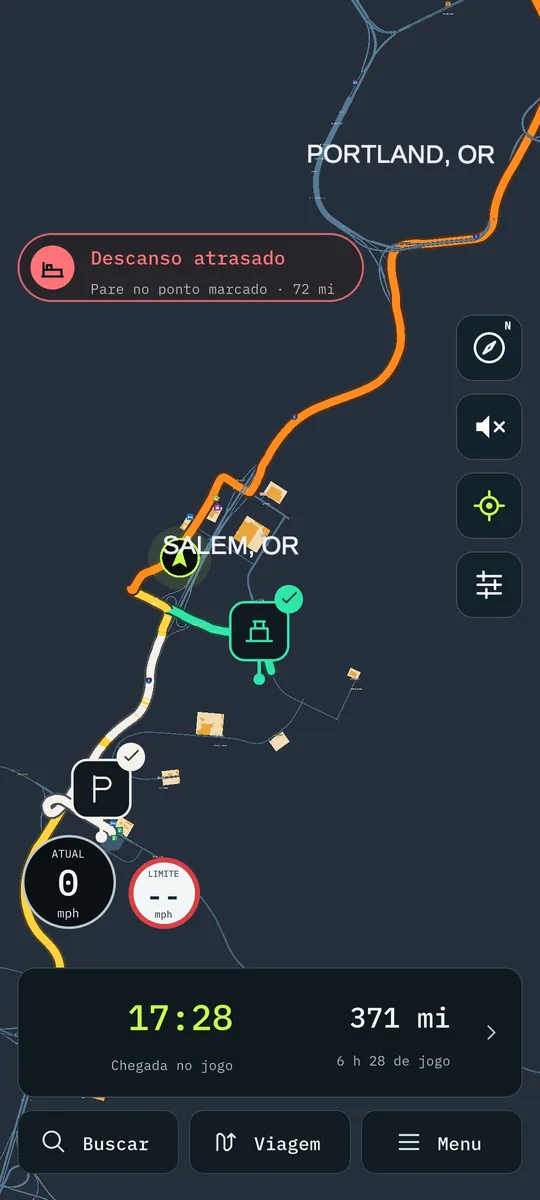
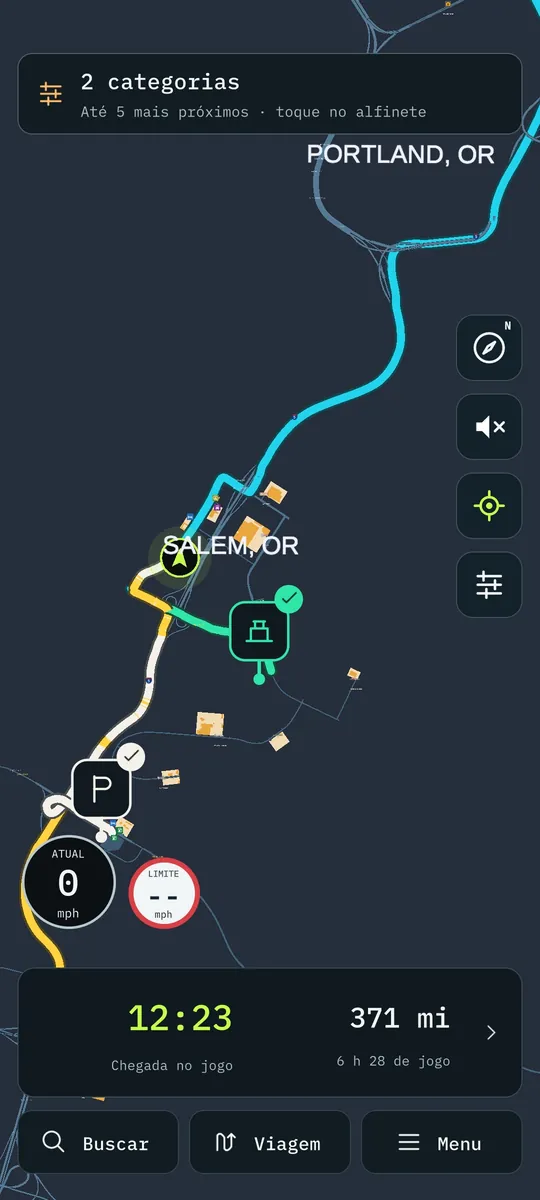
O aviso de descanso no mapa, com o posto marcado mais à frente na rota
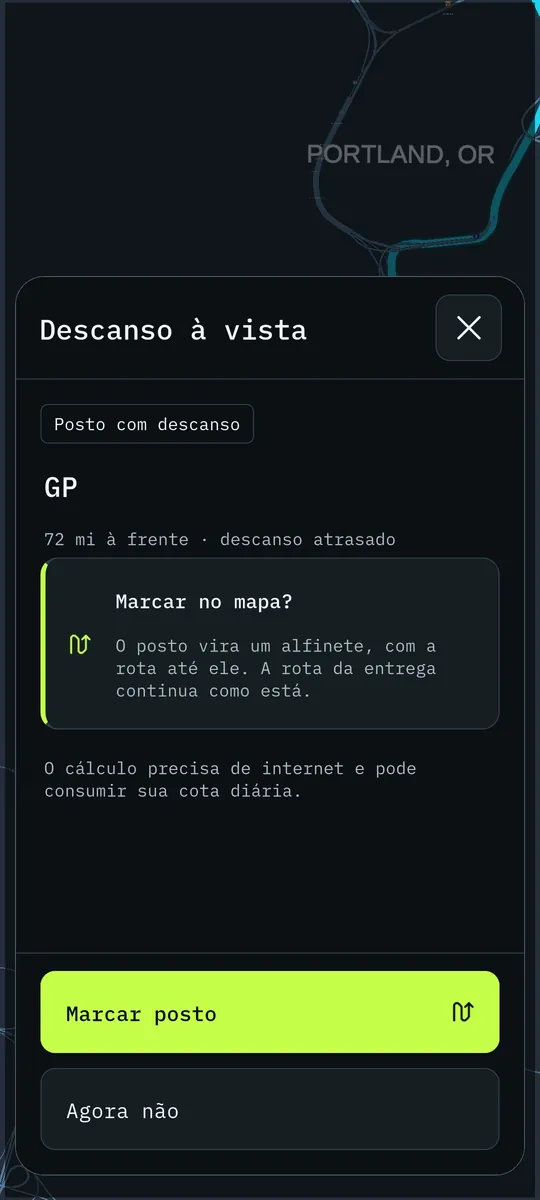
O posto para dormir a um toque: Marcar posto ou Agora não
As linhas até os lugares marcados, cada uma na sua cor

🚀 Novo / Melhorado

  • Entregas de caminhonete com rota. As entregas de pacote da Ford F-150 agora têm rota até o cliente, como qualquer frete. Chegou, entregou ou cancelou, o aplicativo avisa igual. É preciso a ponte 1.1.4 no PC.
  • Aviso de descanso sempre à vista. Quando faltam três horas para você precisar dormir, aparece um aviso pequeno logo abaixo da próxima manobra. Ele fica ali, sem atrapalhar o mapa, até você descansar.
  • A cor diz quanto falta. Azul com até três horas, laranja com até duas, vermelho com até uma. Passou da hora? Ele avisa que o descanso está atrasado.
  • O posto para dormir a um toque. Assim que o aviso aparece, o aplicativo mostra o próximo posto da sua rota que tem estacionamento para dormir. Tocou em Marcar posto, ele entra no mapa com o caminho até ele. Dá para abastecer e descansar na mesma parada, sem sair procurando.
    • Passou direto? O próximo posto da rota toma o lugar, sem perguntar de novo.
    • Já sabe onde vai dormir? Toque em Agora não e ele não insiste. Mudou de ideia? Toque no aviso e o posto aparece de novo. E se você já tinha marcado um posto por conta própria, o seu continua lá.
  • Dormiu, sumiu. Depois do descanso, o aviso e o marcador saem sozinhos.
  • Cada lugar marcado com a sua cor. A linha até um posto, uma oficina, um estacionamento ou uma garagem agora tem cor forte e contorno, igual à rota da entrega. Cada tipo de lugar tem uma cor só dele, e ela é a mesma no marcador, no filtro e no aviso. Com mais de um lugar marcado, dá para saber de relance qual linha leva aonde.

Para o aviso de descanso e as linhas coloridas, a ponte 1.1.3 já serve. Para as entregas de caminhonete, atualize a ponte no PC para a 1.1.4. É só instalar por cima: o pareamento continua.

Boa estrada! 🚛

Todas as versões

  1. 1.3.0Em que pista ficar 🛣️ As setas de faixa, a hora do jogo e a chegada que conta as paradas
  2. 1.2.0Feito para o tablet 📱 O mapa deitado, a busca inteira e as paradas com cara de lugar
  3. 1.1.14A viagem inteira numa imagem 📸 O caminho, as paradas e os estados por onde passou
  4. 1.1.13Do seu jeito 🗺️ Rota com paradas, cada multa explicada e quinze idiomas
  5. 1.1.11Hora de descansar 🛏️ O posto para dormir a um toque e linhas que dá para ler
  6. 1.1.7Trevos que dá para ler 🛣️ Vaga do frete antes de carregar e avarias no painel
  7. 1.1.5South Dakota completo 🗺️ Milhas ou km, vagas de carga e o nome do estado na voz
  8. 1.1.3Sua empresa no celular 💼 Finanças, frota e viagens, e South Dakota e Illinois no mapa
  9. 1.1.0Um aplicativo novo por dentro ✨ Layout novo, painel do caminhão e alfinetes
  10. 1.0.0Na Google Play 🚀 Voz, conta, PRO e o ETS2
All versions ↓

There is a newer version: 1.3.0.

App 1.1.11 · build 20 ·

1.1.11 ~ Time to rest 🛏️ The place to sleep one tap away and lines you can read

The app warns you three hours ahead that rest is coming, changes colour as time runs out and offers to mark on the map the next stop on your route where you can refuel and sleep. And the lines to the place you marked get strong colours, one for each type, in the same style as the delivery route.

With bridge 1.1.4Requires bridge 1.1.3 or newer

Hey, driver!

You know when sleep hits in the middle of the highway and you still have to open the map to look for a place to stop? Not anymore. The app warns you ahead of time and shows you where to stop. And the way to the fuel stop, workshop or parking you marked became much easier to see.

The rest warning on the map, with the stop marked further along the route
The place to sleep one tap away: Pin stop or Not now
The lines to the marked places, each in its own colour

🚀 New / Improved

  • Pickup deliveries with a route. The parcel deliveries of the Ford F-150 now have a route to the customer, like any other job. Arrived, delivered or cancelled, the app tells you the same way. It needs bridge 1.1.4 on the PC.
  • Rest warning always in sight. When you have three hours left before you need to sleep, a small warning shows up right below the next turn. It stays there, out of the map's way, until you rest.
  • The colour tells how much is left. Blue with up to three hours, orange with up to two, red with up to one. Past the time? It tells you rest is overdue.
  • The place to sleep one tap away. As soon as the warning shows up, the app shows the next stop on your route with parking to sleep. Tap Pin stop and it goes onto the map with the way there. You can refuel and rest at the same stop, without going around looking.
    • Drove past it? The next stop on the route takes its place, without asking again.
    • Already know where you'll sleep? Tap Not now and it won't insist. Changed your mind? Tap the warning and the stop shows up again. And if you had already marked a stop yourself, yours stays there.
  • Slept, gone. After resting, the warning and the marker go away on their own.
  • Each marked place in its own colour. The line to a fuel stop, a workshop, a parking lot or a garage now has a strong colour and an outline, like the delivery route. Each type of place has a colour of its own, and it's the same on the marker, in the filter and in the warning. With more than one place marked, you can tell at a glance which line goes where.

For the rest warning and the coloured lines, bridge 1.1.3 is enough. For pickup deliveries, update the PC bridge to 1.1.4. Just install over it: pairing stays.

Safe travels! 🚛

All versions

  1. 1.3.0Which lane to be in 🛣️ Lane arrows, the game clock and an arrival time that counts your stops
  2. 1.2.0Made for the tablet 📱 The map in landscape, the full search and stops that look like places
  3. 1.1.14The whole trip in one image 📸 The route, the stops and the states you drove through
  4. 1.1.13Your way 🗺️ Routes with stops, every fine explained and fifteen languages
  5. 1.1.11Time to rest 🛏️ The place to sleep one tap away and lines you can read
  6. 1.1.7Interchanges you can read 🛣️ The job's spot before loading and damage on the dashboard
  7. 1.1.5South Dakota complete 🗺️ Miles or km, cargo spots and the state name in the voice
  8. 1.1.3Your company on your phone 💼 Finances, fleet and trips, and South Dakota and Illinois on the map
  9. 1.1.0A new app on the inside ✨ New layout, truck dashboard and pins
  10. 1.0.0On Google Play 🚀 Voice, account, PRO and ETS2