Todas as versões ↓

Existe uma versão mais nova: 1.3.0.

Aplicativo 1.1.5 · build 14 ·

1.1.5 ~ South Dakota completo 🗺️ Milhas ou km, vagas de carga e o nome do estado na voz

South Dakota chega completo, com todas as empresas e os logotipos no mapa e na busca. O aplicativo também passa a usar as mesmas unidades e a mesma moeda do seu jogo, mostra as vagas de carga e descarga no mapa, fala "Texas 146" em vez da sigla, esconde as notificações enquanto você dirige e gasta menos bateria.

Com a ponte 1.1.2Requer ponte 1.1.2 ou mais nova

Fala, motorista!

Tem muita coisa nesta. Várias vieram de quem já está rodando com o Truck GPS. Obrigado por contar o que incomodava.
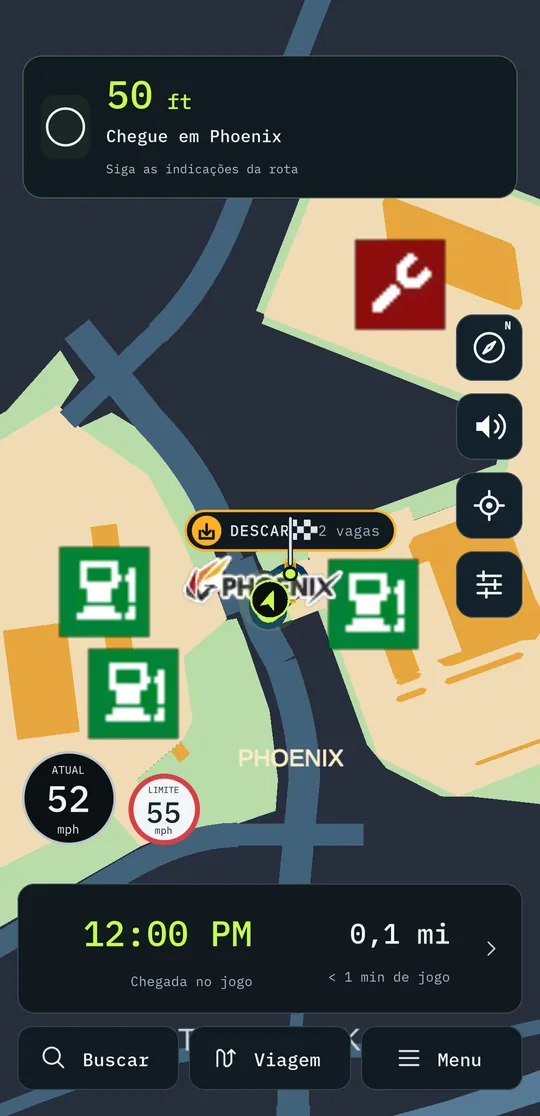
Chegando em Phoenix: as vagas de descarga desenhadas no chão, a 50 pés
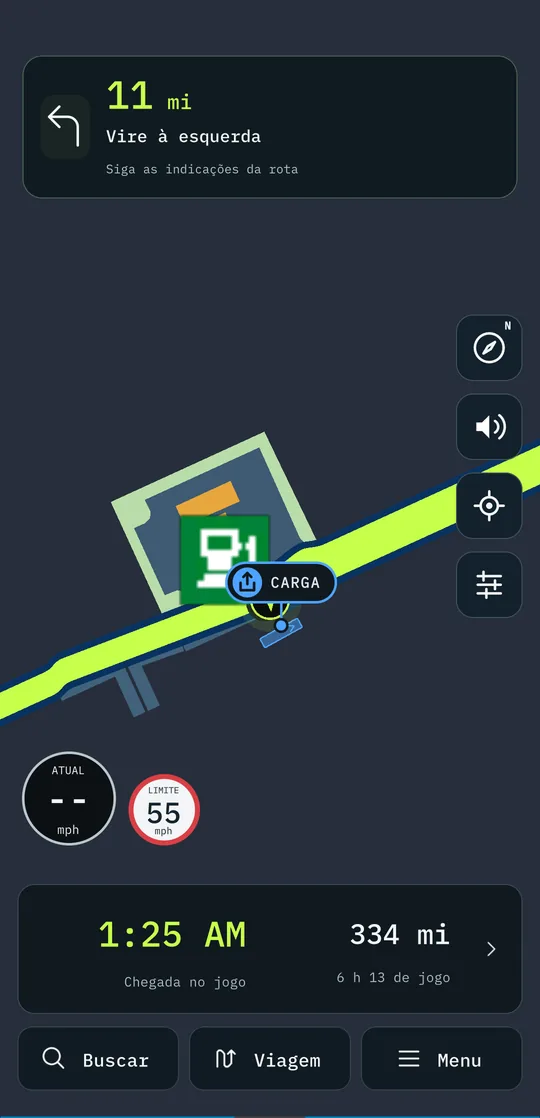
A vaga onde a carga é pega, com a etiqueta CARGA
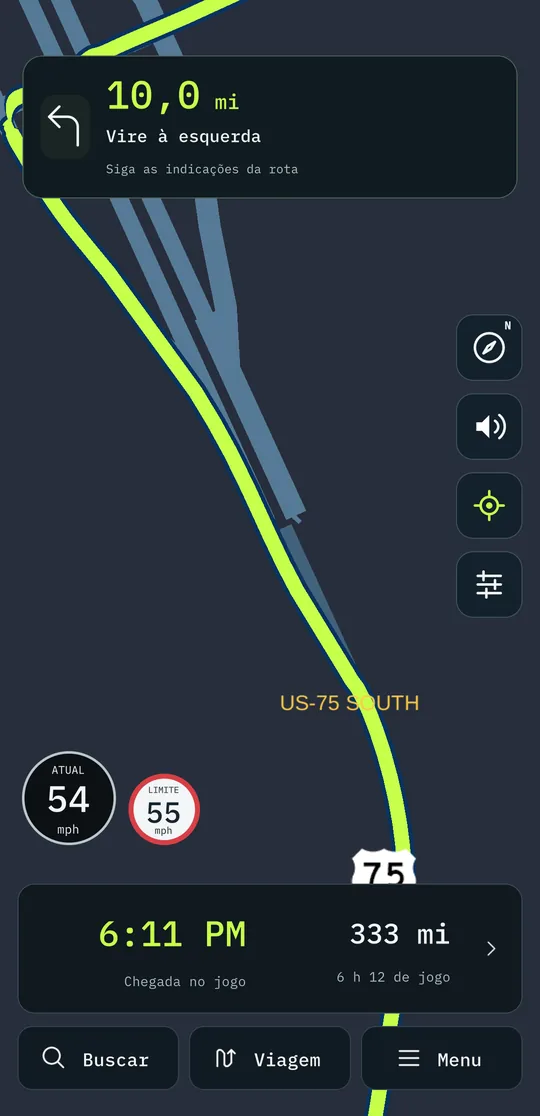
Distâncias em milhas, como no jogo

🚀 Novo / Melhorado

  • South Dakota completo. Faltavam 147 filiais na busca e três empresas novas nem apareciam no mapa. Agora estão todas, cada uma com o seu logotipo.
  • Os números do jeito do seu jogo. Milhas ou quilômetros, galões ou litros, libras ou quilos, relógio de 12 ou 24 horas e a moeda que você escolheu no jogo: o aplicativo escreve tudo igual. A voz também fala em pés e milhas.
    • Prefere outro? Nas Configurações dá para forçar métrico ou imperial.
  • Vagas de carga e descarga no mapa, no tamanho real e viradas como no jogo, com a etiqueta CARGA ou DESCARGA. O início da rota ganha um disco e o fim, uma bandeira. Perto da vaga, a câmera aproxima para o caminhão e a vaga caberem juntos na tela.
  • A voz diz o nome do estado: "Texas 146" em vez de "tê xis 146", e "Springfield, Missouri" em vez de "Springfield, MO".
  • Não perturbe enquanto dirige. Uma chave nas Configurações silencia as notificações do Android com o aplicativo aberto, para mensagem nenhuma cobrir o mapa no meio da estrada.
  • No ETS2, o mapa ganha os logotipos de empresa e os escudos de estrada que faltavam.
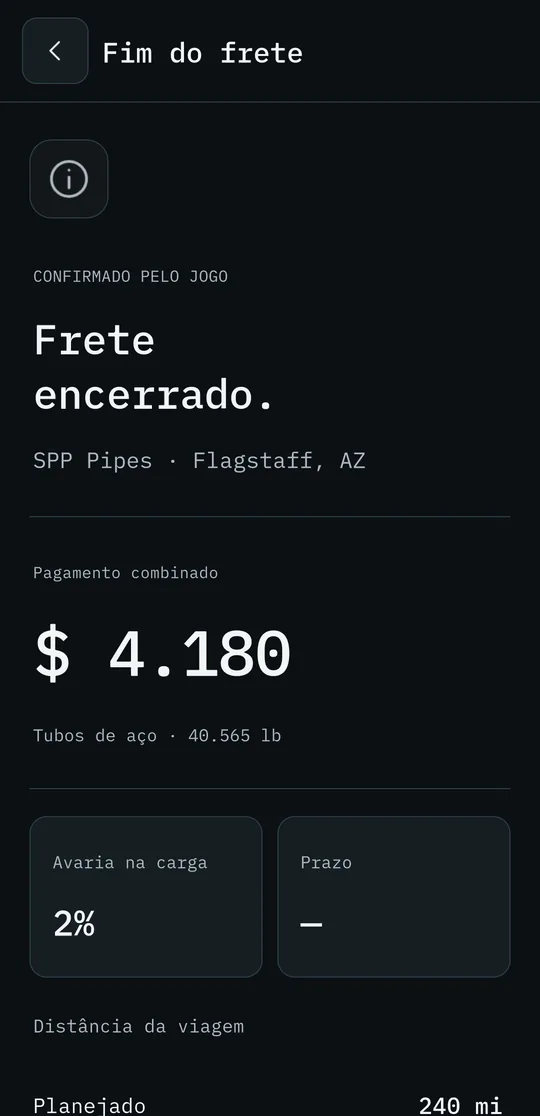
  • O resumo do fim de frete também no layout novo.
  • Mapa mais leve: gasta menos bateria e esquenta menos o celular no suporte, sem perder a fluidez ao arrastar e aproximar.
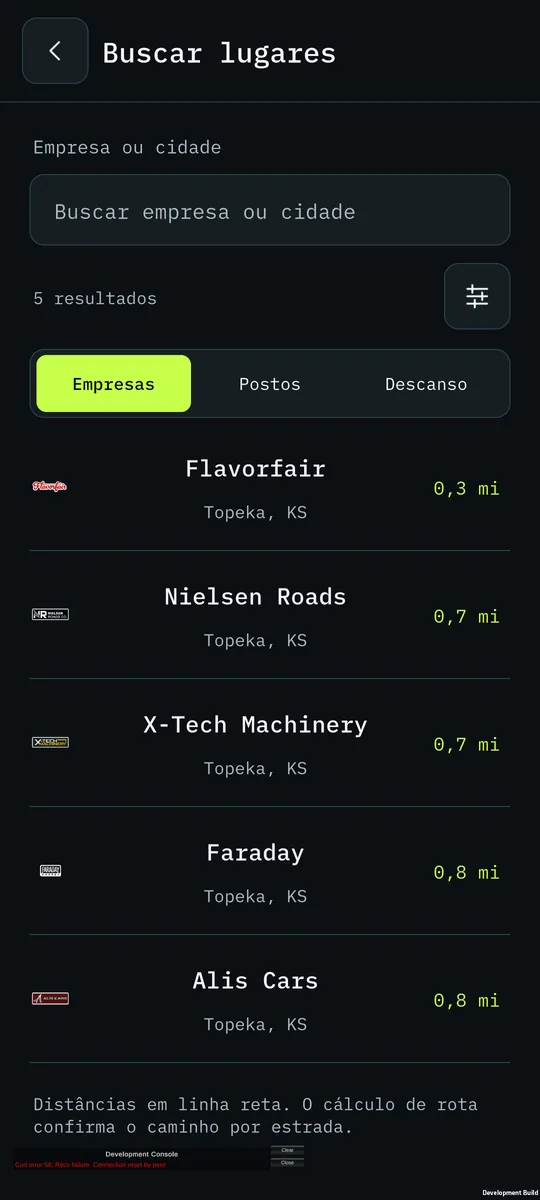
A busca de lugares, com o logotipo de cada empresa
O resumo do fim de frete no layout novo

🐛 Corrigido

  • A distância da próxima manobra pulava em trevos e viadutos, e a seta e a voz trocavam de manobra sozinhas. Agora a distância, a seta e a voz ficam firmes até a manobra certa.
  • Pedaços do layout antigo apareciam por cima do novo.

🖥️ Na ponte do PC: 1.1.2

  • Com a ponte 1.1.2, o celular passa a falar as mesmas unidades do seu jogo e a mostrar as vagas de carga e descarga.

Com uma ponte mais antiga o aplicativo funciona, mas sem esses dois recursos. Atualize os dois juntos.

Boa estrada! 🚛

Todas as versões

  1. 1.3.0Em que pista ficar 🛣️ As setas de faixa, a hora do jogo e a chegada que conta as paradas
  2. 1.2.0Feito para o tablet 📱 O mapa deitado, a busca inteira e as paradas com cara de lugar
  3. 1.1.14A viagem inteira numa imagem 📸 O caminho, as paradas e os estados por onde passou
  4. 1.1.13Do seu jeito 🗺️ Rota com paradas, cada multa explicada e quinze idiomas
  5. 1.1.11Hora de descansar 🛏️ O posto para dormir a um toque e linhas que dá para ler
  6. 1.1.7Trevos que dá para ler 🛣️ Vaga do frete antes de carregar e avarias no painel
  7. 1.1.5South Dakota completo 🗺️ Milhas ou km, vagas de carga e o nome do estado na voz
  8. 1.1.3Sua empresa no celular 💼 Finanças, frota e viagens, e South Dakota e Illinois no mapa
  9. 1.1.0Um aplicativo novo por dentro ✨ Layout novo, painel do caminhão e alfinetes
  10. 1.0.0Na Google Play 🚀 Voz, conta, PRO e o ETS2
All versions ↓

There is a newer version: 1.3.0.

App 1.1.5 · build 14 ·

1.1.5 ~ South Dakota complete 🗺️ Miles or km, cargo spots and the state name in the voice

South Dakota arrives complete, with every company and its logo on the map and in search. The app also uses the same units and currency as your game, shows the pickup and delivery spots on the map, says "Texas 146" instead of the abbreviation, hides notifications while you drive and uses less battery.

With bridge 1.1.2Requires bridge 1.1.2 or newer

Hey, driver!

There's a lot in this one. Several things came from people already driving with Truck GPS. Thanks for telling us what bothered you.

Arriving in Phoenix: the delivery spots drawn on the ground, 50 feet away
The spot where the cargo is picked up, labelled CARGO
Distances in miles, like in the game

🚀 New / Improved

  • South Dakota complete. 147 branches were missing from search and three new companies didn't even show on the map. Now they are all there, each with its logo.
  • Numbers the way your game shows them. Miles or kilometres, gallons or litres, pounds or kilos, 12- or 24-hour clock and the currency you picked in the game: the app writes everything the same way. The voice speaks in feet and miles too.
    • Prefer something else? In Settings you can force metric or imperial.
  • Pickup and delivery spots on the map, at real size and facing the way they do in the game, labelled CARGO or DELIVERY. The start of the route gets a disc and the end a flag. Near the spot, the camera zooms in so the truck and the spot fit on screen together.
  • The voice says the state name: "Texas 146" instead of "T X 146", and "Springfield, Missouri" instead of "Springfield, MO".
  • Do not disturb while driving. A switch in Settings silences Android notifications while the app is open, so no message covers the map in the middle of the road.
  • In ETS2, the map gets the company logos and road shields that were missing.
  • The end-of-job summary in the new layout too.
  • Lighter map: uses less battery and heats the phone less in its mount, without losing smoothness when dragging and zooming.
Place search, with each company's logo
The end-of-job summary in the new layout

🐛 Fixed

  • The distance to the next turn jumped at interchanges and overpasses, and the arrow and the voice switched turns on their own. Now the distance, the arrow and the voice stay steady until the right turn.
  • Pieces of the old layout showed up on top of the new one.

🖥️ On the PC bridge: 1.1.2

  • With bridge 1.1.2, the phone speaks the same units as your game and shows the pickup and delivery spots.

With an older bridge the app works, but without those two features. Update both together.

Safe travels! 🚛

All versions

  1. 1.3.0Which lane to be in 🛣️ Lane arrows, the game clock and an arrival time that counts your stops
  2. 1.2.0Made for the tablet 📱 The map in landscape, the full search and stops that look like places
  3. 1.1.14The whole trip in one image 📸 The route, the stops and the states you drove through
  4. 1.1.13Your way 🗺️ Routes with stops, every fine explained and fifteen languages
  5. 1.1.11Time to rest 🛏️ The place to sleep one tap away and lines you can read
  6. 1.1.7Interchanges you can read 🛣️ The job's spot before loading and damage on the dashboard
  7. 1.1.5South Dakota complete 🗺️ Miles or km, cargo spots and the state name in the voice
  8. 1.1.3Your company on your phone 💼 Finances, fleet and trips, and South Dakota and Illinois on the map
  9. 1.1.0A new app on the inside ✨ New layout, truck dashboard and pins
  10. 1.0.0On Google Play 🚀 Voice, account, PRO and ETS2