Todas as versões ↓

Existe uma versão mais nova: 1.3.0.

Aplicativo 1.1.7 · build 16 ·

1.1.7 ~ Trevos que dá para ler 🛣️ Vaga do frete antes de carregar e avarias no painel

Os trevos e viadutos ficam fáceis de ler, e a rota não some mais embaixo da estrada. A vaga onde estacionar o seu reboque aparece antes de carregar, o painel mostra a avaria do caminhão, do reboque e da carga com barras, e o relógio e o prazo batem com os do jogo.

Com a ponte 1.1.3Requer ponte 1.1.3 ou mais nova

Fala, motorista!

Esta é sobre aquele momento de chegar num trevo grande e não saber qual das alças é a sua. Agora dá para ler de longe. E tem mais: o frete e o painel ficaram mais parecidos com o que você vê no jogo.
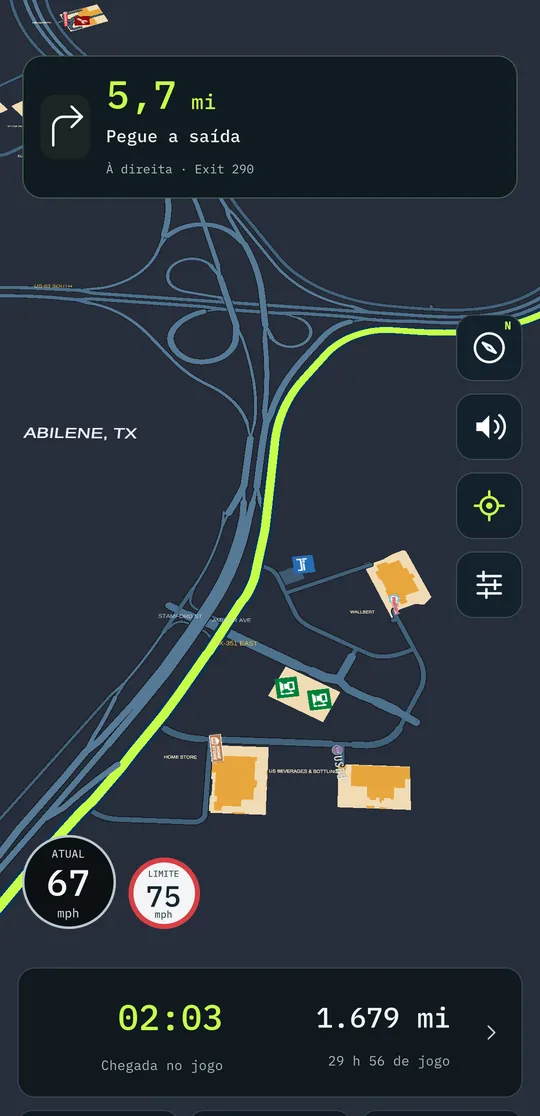
Chegando no trevo de Abilene: cada alça separada e a rota por cima das pistas
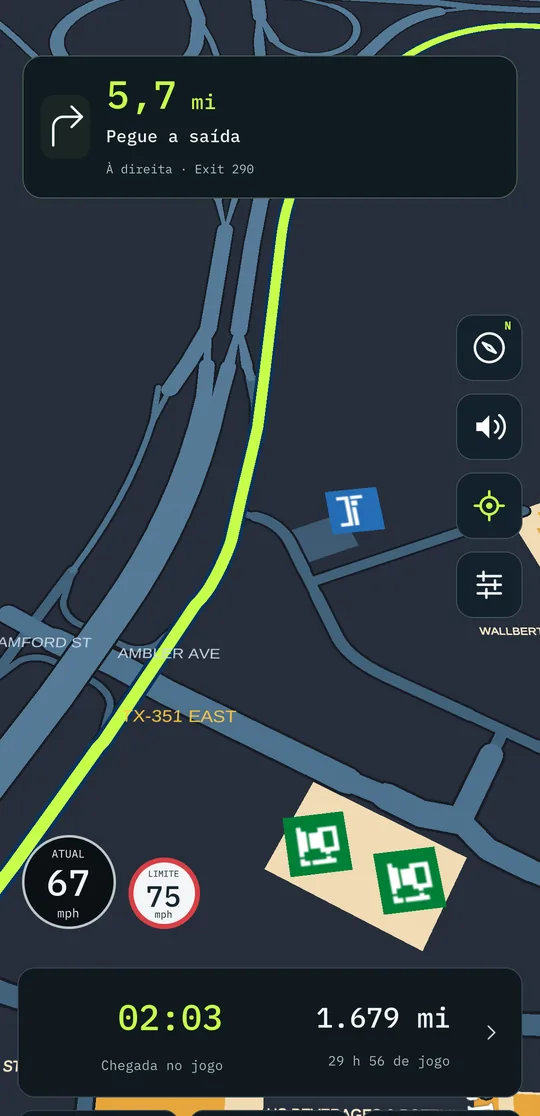
De perto: a rota segue a pista certa por dentro do trevo

🚀 Novo / Melhorado

  • Trevos que dá para ler. Cada pista ganha um contorno próprio, então as pistas paralelas não se fundem mais numa faixa larga, e dá para ver onde cada alça cruza a rodovia.
  • Viadutos de verdade. Onde uma estrada passa por cima da outra, a de cima cobre a de baixo, como no jogo. A rota faz o mesmo: some embaixo do viaduto quando você passa por baixo e corre por cima quando é você que está na ponte.
  • A vaga do frete antes de carregar. Nos fretes em que o reboque já é seu, o mapa mostra onde estacionar para carregar assim que você aceita o frete, e não só depois de carregado.
  • Avarias no painel, com barra. O painel mostra a avaria do caminhão, do reboque e da carga, cada uma com uma barra que fica âmbar a partir de 25 %. De relance você sabe se é hora de passar na oficina.
  • O relógio com o fuso do estado. Como no jogo, a hora vem com o fuso de onde você está, e muda quando você cruza a divisa.
  • O mapa acompanha a sua velocidade também com o norte para cima. Parado e manobrando no pátio, ele chega bem perto; na cidade fica no meio; na rodovia abre, mas ainda um terço mais perto que antes. Continua aproximando antes das manobras e enquadrando a vaga do frete.
    • Deu zoom com os dedos? O mapa respeita por alguns segundos e volta a acompanhar. Arrastou o mapa? O zoom fica onde você deixou.

🐛 Corrigido

  • Hora, descanso e prazo com uma hora de diferença. Em alguns estados o aplicativo mostrava uma hora a mais que o jogo. Agora bate.
  • Avaria do caminhão e do reboque diferente da do jogo. Os números agora são os mesmos que o jogo mostra.
  • A rota sumia embaixo da própria estrada e só aparecia em pedaços. Agora ela fica inteira por cima da pista por onde você vai.
  • Manchas, abas e calombos nos trevos. As emendas das pistas ficavam com pontas sobrando, e cada entrada e saída tinha um calombo mais largo que a estrada. Sumiram.

Para a hora, as avarias e a vaga antes de carregar, atualize a ponte no PC para a 1.1.3. É só instalar por cima: o pareamento continua.

Boa estrada! 🚛

Todas as versões

  1. 1.3.0Em que pista ficar 🛣️ As setas de faixa, a hora do jogo e a chegada que conta as paradas
  2. 1.2.0Feito para o tablet 📱 O mapa deitado, a busca inteira e as paradas com cara de lugar
  3. 1.1.14A viagem inteira numa imagem 📸 O caminho, as paradas e os estados por onde passou
  4. 1.1.13Do seu jeito 🗺️ Rota com paradas, cada multa explicada e quinze idiomas
  5. 1.1.11Hora de descansar 🛏️ O posto para dormir a um toque e linhas que dá para ler
  6. 1.1.7Trevos que dá para ler 🛣️ Vaga do frete antes de carregar e avarias no painel
  7. 1.1.5South Dakota completo 🗺️ Milhas ou km, vagas de carga e o nome do estado na voz
  8. 1.1.3Sua empresa no celular 💼 Finanças, frota e viagens, e South Dakota e Illinois no mapa
  9. 1.1.0Um aplicativo novo por dentro ✨ Layout novo, painel do caminhão e alfinetes
  10. 1.0.0Na Google Play 🚀 Voz, conta, PRO e o ETS2
All versions ↓

There is a newer version: 1.3.0.

App 1.1.7 · build 16 ·

1.1.7 ~ Interchanges you can read 🛣️ The job's spot before loading and damage on the dashboard

Interchanges and overpasses are easy to read, and the route no longer disappears under the road. The spot where to park your trailer shows up before loading, the dashboard shows truck, trailer and cargo damage with bars, and the clock and the deadline match the game's.

With bridge 1.1.3Requires bridge 1.1.3 or newer

Hey, driver!

This one is about that moment when you reach a big interchange and can't tell which ramp is yours. Now you can read it from afar. And there's more: the job and the dashboard look more like what you see in the game.

Arriving at the Abilene interchange: each ramp separate and the route on top of the lanes
Up close: the route follows the right lane through the interchange

🚀 New / Improved

  • Interchanges you can read. Each lane gets its own outline, so parallel lanes no longer merge into one wide band, and you can see where each ramp crosses the highway.
  • Real overpasses. Where one road passes over another, the upper one covers the lower one, like in the game. The route does the same: it disappears under the overpass when you go under it and runs on top when you are the one on the bridge.
  • The job's spot before loading. On jobs where the trailer is already yours, the map shows where to park to load as soon as you accept the job, not only after loading.
  • Damage on the dashboard, with bars. The dashboard shows truck, trailer and cargo damage, each with a bar that turns amber from 25 %. At a glance you know whether it's time to visit the workshop.
  • The clock with the state's time zone. Like in the game, the time comes with the time zone of where you are, and changes when you cross the state line.
  • The map follows your speed with north up too. Stopped and manoeuvring in the yard, it comes in close; in the city it sits in the middle; on the highway it opens up, but still a third closer than before. It still zooms in before turns and frames the job's spot.
    • Pinched to zoom? The map respects it for a few seconds and then goes back to following. Dragged the map? The zoom stays where you left it.

🐛 Fixed

  • Time, rest and deadline one hour off. In some states the app showed one hour more than the game. Now they match.
  • Truck and trailer damage different from the game's. The numbers are now the same the game shows.
  • The route disappeared under its own road and only showed up in pieces. Now it stays whole on top of the lane you are driving.
  • Stains, flaps and bumps at interchanges. The lane joins had leftover tips, and every on- and off-ramp had a bump wider than the road. They're gone.

For the time, the damage and the spot before loading, update the PC bridge to 1.1.3. Just install over it: pairing stays.

Safe travels! 🚛

All versions

  1. 1.3.0Which lane to be in 🛣️ Lane arrows, the game clock and an arrival time that counts your stops
  2. 1.2.0Made for the tablet 📱 The map in landscape, the full search and stops that look like places
  3. 1.1.14The whole trip in one image 📸 The route, the stops and the states you drove through
  4. 1.1.13Your way 🗺️ Routes with stops, every fine explained and fifteen languages
  5. 1.1.11Time to rest 🛏️ The place to sleep one tap away and lines you can read
  6. 1.1.7Interchanges you can read 🛣️ The job's spot before loading and damage on the dashboard
  7. 1.1.5South Dakota complete 🗺️ Miles or km, cargo spots and the state name in the voice
  8. 1.1.3Your company on your phone 💼 Finances, fleet and trips, and South Dakota and Illinois on the map
  9. 1.1.0A new app on the inside ✨ New layout, truck dashboard and pins
  10. 1.0.0On Google Play 🚀 Voice, account, PRO and ETS2