Todas as versões ↓

Existe uma versão mais nova: 1.3.0.

Aplicativo 1.2.0 · build 24 ·

1.2.0 ~ Feito para o tablet 📱 O mapa deitado, a busca inteira e as paradas com cara de lugar

No tablet, o Truck GPS agora abre deitado, com o passo a passo ao lado do mapa e cada tela pensada para a tela grande. A busca mostra todos os lugares, e não só os cinco mais perto. E as paradas da rota aparecem no mapa com o ícone do que elas são.

Versão principal

Fala, motorista!

Quem usa o tablet preso no painel pediu, e chegou: o Truck GPS agora deita. O mapa ocupa a tela larga, o passo a passo fica do lado, sempre à vista, e cada tela do aplicativo ganhou um desenho próprio para o tablet, com letra grande para ler de relance. No celular, tudo continua em pé, do jeito que você já conhece.
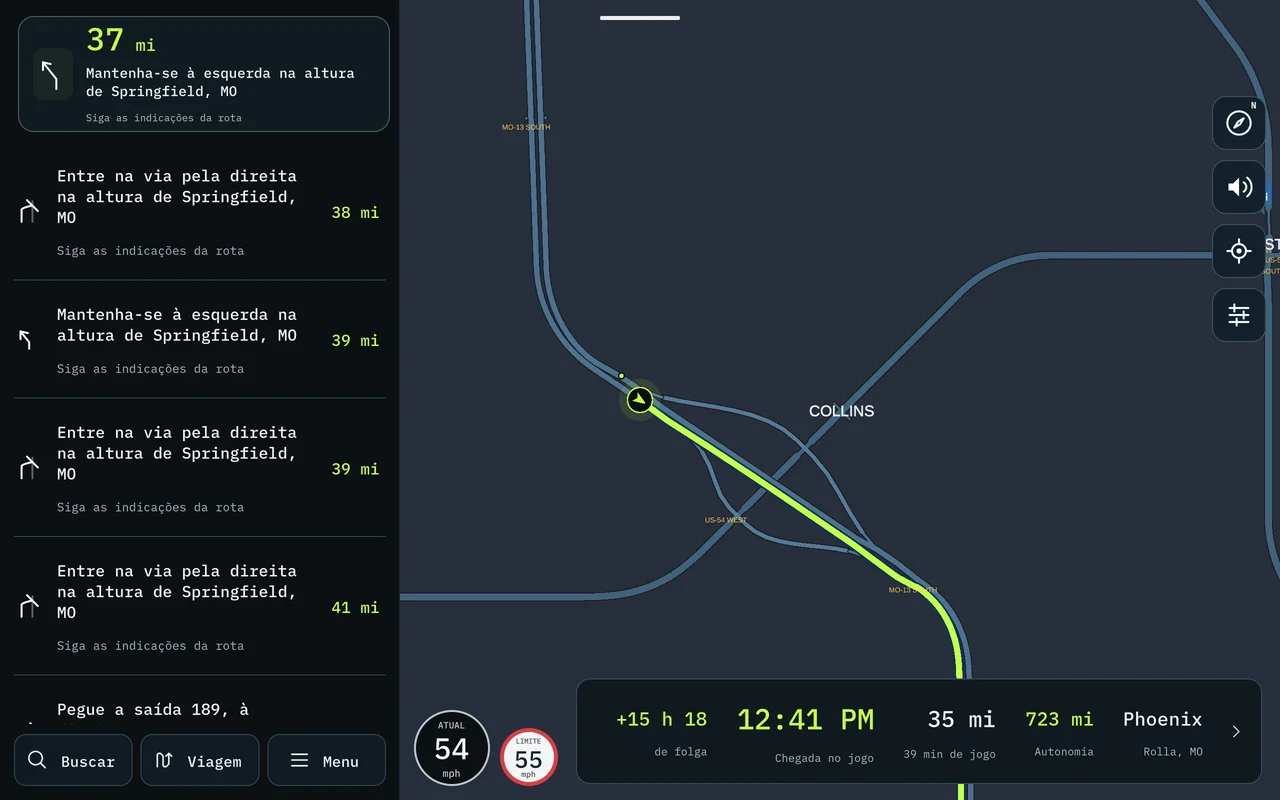
O mapa deitado no tablet, com o passo a passo ao lado e a chegada embaixo

🚀 Novo / Melhorado

  • O tablet deitado. Abriu num tablet, o aplicativo fica na horizontal sozinho. No celular, nada muda: ele continua em pé.
  • O passo a passo ao lado do mapa. Com uma rota ativa, a manobra atual fica no alto de uma coluna à esquerda e, embaixo dela, todas as seguintes, numa lista que você rola com o dedo. O mapa continua inteiro do lado.
  • A chegada com mais informação. Onde sobra espaço, a faixa de baixo mostra também a folga do prazo (em verde, ou em vermelho se você estiver atrasado), quanto o tanque ainda aguenta e o destino da carga.
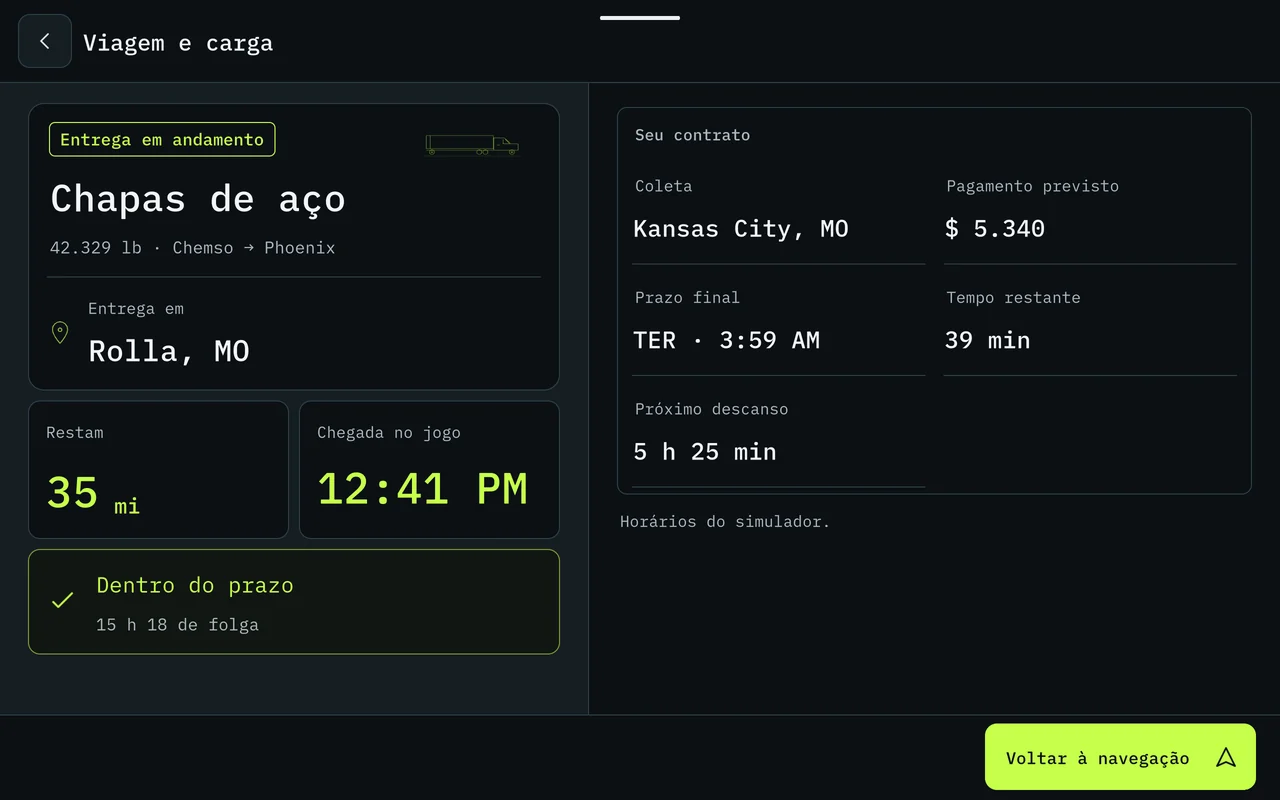
  • Cada tela do jeito do tablet. Menu, Caminhão, Viagem e carga, Buscar lugares e Lugares no mapa se abrem em duas colunas ou em grade, aproveitando a tela larga, com números e mostradores grandes para ler sem tirar o olho da estrada por muito tempo.
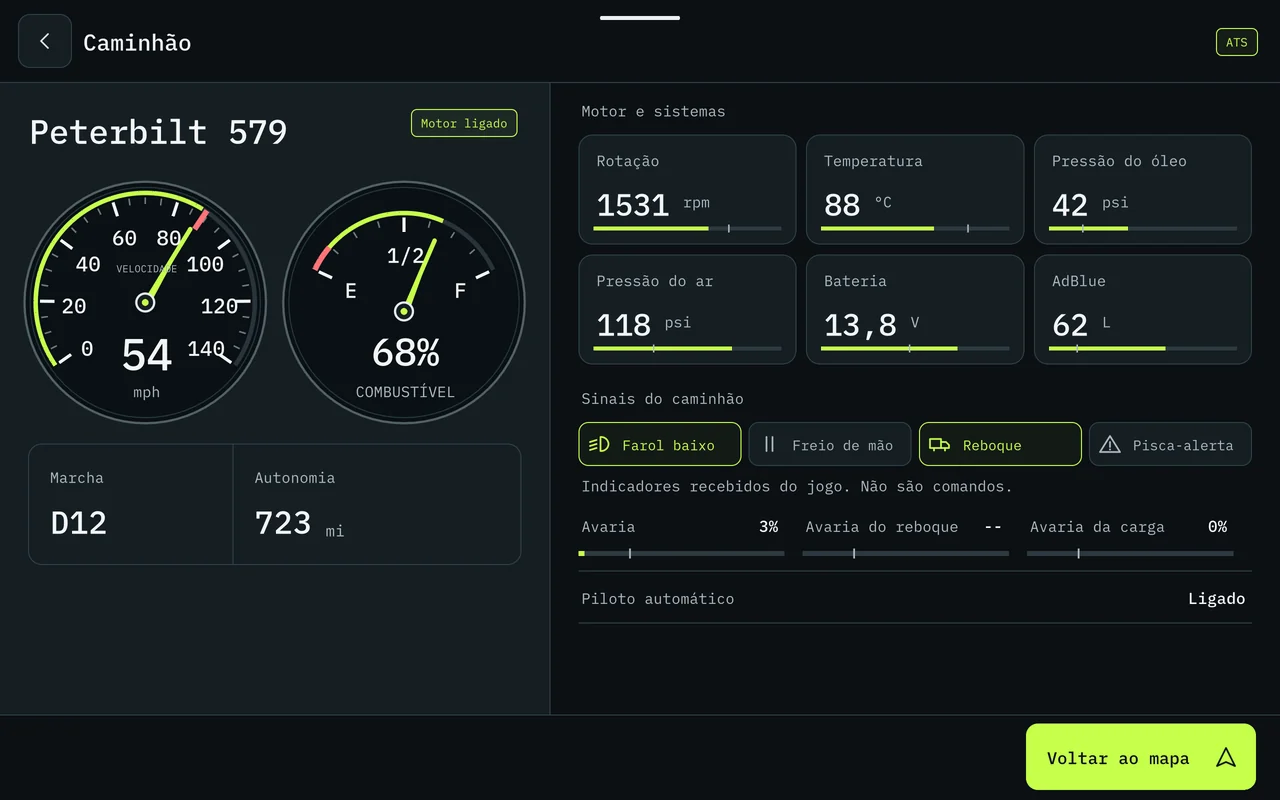
O caminhão no tablet: os mostradores grandes de um lado, motor e sistemas do outro
Viagem e carga no tablet: a carga e o prazo de um lado, o contrato do outro
  • A busca mostra todos os lugares. Antes a lista parava nos cinco mais perto. Agora ela começa pelos mais próximos e vai trazendo mais conforme você rola, até acabar. Vale no celular e no tablet.
  • Lugares no mapa em grade. No tablet, as categorias aparecem em cartões, com o ícone e a cor de cada uma; a ligada fica destacada.
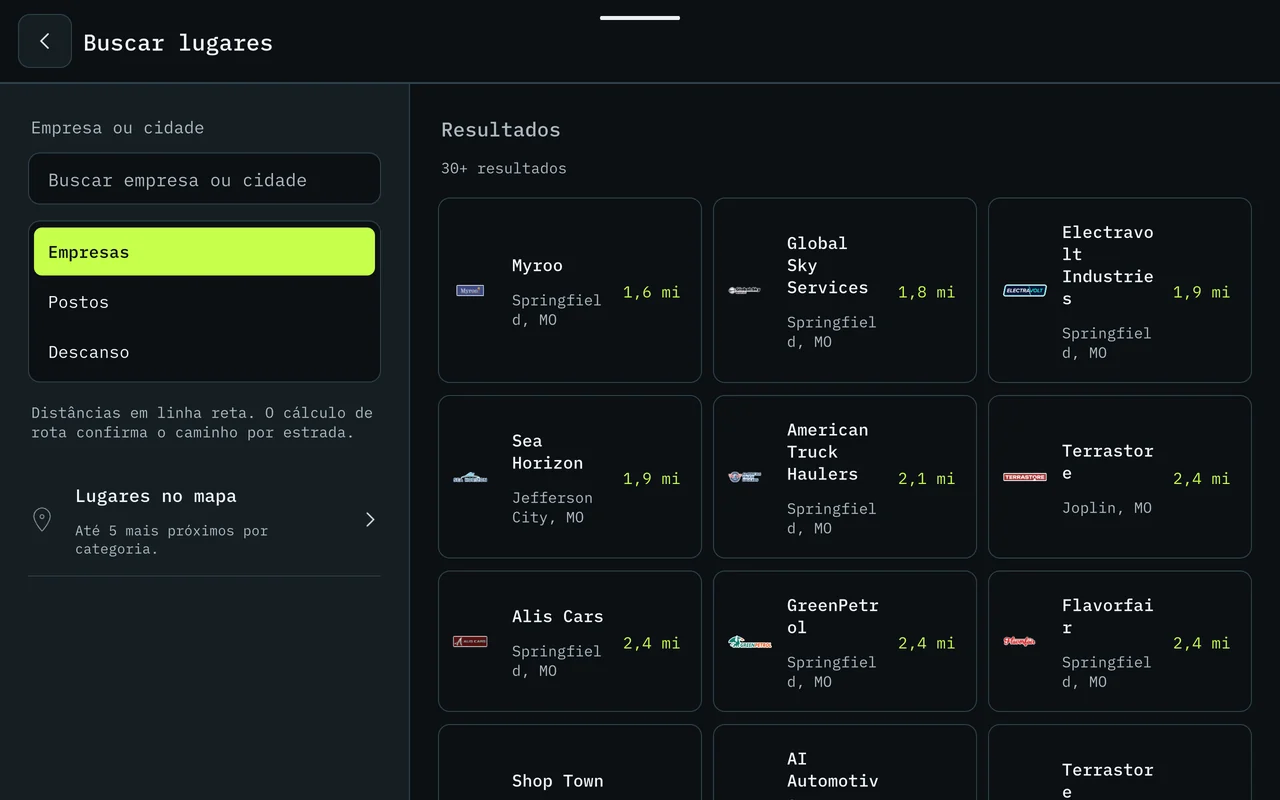
Buscar lugares no tablet: a busca de um lado, os resultados em grade do outro
  • As paradas com cara de lugar. Na rota com várias paradas, a próxima continua na placa de sempre. As seguintes viram uma gota na cor do lugar, com o ícone no meio (posto, descanso, oficina…) e o número da parada num selo em cima. Dá para saber de longe o que vem pela frente.

⚠️ Problemas conhecidos

  • No tablet, algumas telas menos usadas, como Ajustes, ainda abrem numa coluna no meio da tela. Elas ganham o desenho do tablet nas próximas versões.

Boa estrada! 🚛

Todas as versões

  1. 1.3.0Em que pista ficar 🛣️ As setas de faixa, a hora do jogo e a chegada que conta as paradas
  2. 1.2.0Feito para o tablet 📱 O mapa deitado, a busca inteira e as paradas com cara de lugar
  3. 1.1.14A viagem inteira numa imagem 📸 O caminho, as paradas e os estados por onde passou
  4. 1.1.13Do seu jeito 🗺️ Rota com paradas, cada multa explicada e quinze idiomas
  5. 1.1.11Hora de descansar 🛏️ O posto para dormir a um toque e linhas que dá para ler
  6. 1.1.7Trevos que dá para ler 🛣️ Vaga do frete antes de carregar e avarias no painel
  7. 1.1.5South Dakota completo 🗺️ Milhas ou km, vagas de carga e o nome do estado na voz
  8. 1.1.3Sua empresa no celular 💼 Finanças, frota e viagens, e South Dakota e Illinois no mapa
  9. 1.1.0Um aplicativo novo por dentro ✨ Layout novo, painel do caminhão e alfinetes
  10. 1.0.0Na Google Play 🚀 Voz, conta, PRO e o ETS2
All versions ↓

There is a newer version: 1.3.0.

App 1.2.0 · build 24 ·

1.2.0 ~ Made for the tablet 📱 The map in landscape, the full search and stops that look like places

On a tablet, Truck GPS now opens in landscape, with the turn-by-turn list next to the map and every screen designed for the big screen. Search shows every place, not just the five closest. And the stops on your route appear on the map with the icon of what they are.

Major release

Hey, driver!

Those of you with a tablet mounted on the dash asked for it, and here it is: Truck GPS now lies down. The map fills the wide screen, the turn-by-turn list sits beside it, always in view, and every screen in the app got its own tablet layout, with large text you can read at a glance. On the phone, everything stays upright, just the way you know it.

The map in landscape on the tablet, with the turn-by-turn list beside it and the arrival bar below

🚀 New / Improved

  • The tablet in landscape. Open it on a tablet and the app turns horizontal by itself. On the phone, nothing changes: it stays upright.
  • Turn-by-turn beside the map. With an active route, the current maneuver sits at the top of a column on the left and, below it, all the following ones, in a list you scroll with your finger. The map stays whole beside it.
  • More on the arrival bar. Where there is room, the bottom bar also shows how much time you have left before the deadline (in green, or in red if you are late), how far the tank will still take you and the cargo's destination.
  • Every screen made for the tablet. Menu, Truck, Trip and cargo, Search places and Places on the map open in two columns or in a grid, making use of the wide screen, with big numbers and gauges you can read without taking your eyes off the road for long.
The truck on the tablet: big gauges on one side, engine and systems on the other
Trip and cargo on the tablet: the cargo and the deadline on one side, the contract on the other
  • Search shows every place. The list used to stop at the five closest. Now it starts with the nearest and keeps loading more as you scroll, until there are no more. On both phone and tablet.
  • Places on the map in a grid. On the tablet, the categories appear as cards, with each one's icon and color; the one that is on is highlighted.
Search places on the tablet: the search on one side, the results in a grid on the other
  • Stops that look like places. On a route with several stops, the next one is still on the usual sign. The ones after it become a pin in the place's color, with the icon in the middle (fuel, rest, service…) and the stop number on a badge on top. You can tell from afar what is coming up.

⚠️ Known issues

  • On the tablet, some less used screens, such as Settings, still open in a single column in the middle of the screen. They get the tablet layout in upcoming versions.

Safe travels! 🚛

All versions

  1. 1.3.0Which lane to be in 🛣️ Lane arrows, the game clock and an arrival time that counts your stops
  2. 1.2.0Made for the tablet 📱 The map in landscape, the full search and stops that look like places
  3. 1.1.14The whole trip in one image 📸 The route, the stops and the states you drove through
  4. 1.1.13Your way 🗺️ Routes with stops, every fine explained and fifteen languages
  5. 1.1.11Time to rest 🛏️ The place to sleep one tap away and lines you can read
  6. 1.1.7Interchanges you can read 🛣️ The job's spot before loading and damage on the dashboard
  7. 1.1.5South Dakota complete 🗺️ Miles or km, cargo spots and the state name in the voice
  8. 1.1.3Your company on your phone 💼 Finances, fleet and trips, and South Dakota and Illinois on the map
  9. 1.1.0A new app on the inside ✨ New layout, truck dashboard and pins
  10. 1.0.0On Google Play 🚀 Voice, account, PRO and ETS2